Most advice on how to rank higher on Google Maps is a list of twenty things presented as if Google had confirmed all twenty. It hasn’t. Google has publicly tied exactly two things on your Business Profile to your local ranking, and the rest of any checklist — including the one below — is defensible best practice.
That distinction matters, because it tells you what to do first. So this is the 2026 checklist with the evidence attached: what Google itself says, what has been tested and found not to work, and the three features every other guide will tell you to use that you cannot use in the UK.
What Google actually says decides your Maps ranking
Google publishes this, and it is short. Local results are based mainly on three things:
| Factor | Google’s own words | What you can do about it |
|---|---|---|
| Relevance | “How well a Business Profile matches what someone is searching for.” | A lot. Categories, services, a complete profile. |
| Distance | “How far each business is from the customer who’s searching.” | Almost nothing. This is the hard ceiling. |
| Prominence | “How well-known a business is… based on info like how many websites link to your business and how many reviews you have.” | A lot, slowly. Links, reviews, being a real business people talk about. |
Two sentences on that same Google page are worth more than most of the advice written about it. The first: “There’s no way to request or pay for a better local ranking on Google.” The second: “Businesses with complete and accurate information are easier to match with the right searches.”
That second one is the engine behind every checklist ever written, including this one. Google is not saying each field is a ranking signal. It is saying a complete profile is easier to match to a search. Those are different claims, and the difference is why you should not spend a Saturday geotagging photographs.
Only two things on your profile are confirmed to move your ranking
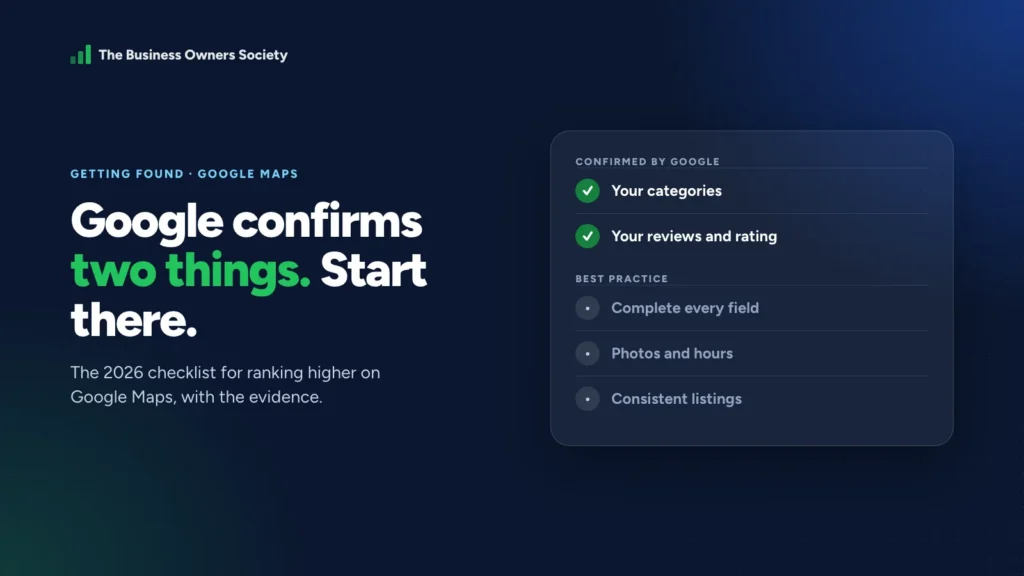
In plain, unambiguous language on its own help pages, Google ties exactly two parts of your Business Profile to local ranking:
Your categories
“The categories you select affect your local ranking on Google.” That is a direct quote from Google’s page on choosing a category. It is the only profile field Google states this plainly about.
Your reviews and ratings
“More reviews and positive ratings can help your business’s local ranking.” Also a direct quote. Note what it says: more reviews, and positive ratings. Not recency, not velocity, not whether you reply.
Everything else in the twenty points below is there because a complete, accurate, actively maintained profile is easier for Google to match, and because a half-finished profile loses the click even when it ranks. Both of those are real. Neither is the same as “Google counts this as a ranking factor”.
ChatGPT for Business Owners
50 copy-and-paste AI prompts for sales, marketing, customers, admin and money. Works with any AI tool.
If you only do two things this month, do your categories and your reviews.
Confirmed by Google
- Your categories
- Your number of reviews and your rating
Sensible best practice
- Every profile field complete and accurate
- Correct hours, including holidays
- Real photos, added regularly
- Consistent name, address and phone across the web
- Replying to reviews
- A website that matches the profile
The 20-point Google Maps readiness check
Tick what is genuinely true of your profile right now — go and look, don’t go from memory. Everything here is a field that exists in 2026; nothing on this list has been retired.
The three green ones are the ones Google has confirmed. If you tick nothing else this week, tick those. A profile scoring 11 with the categories right beats a profile scoring 18 with the categories wrong.
If you would rather see where you currently show up before you start fixing things, the free map scan checks your position across a grid of your town rather than from one spot, which is the only way to see the real picture.
Your primary category is the biggest lever you have
One primary category, up to nine additional ones. Google’s guidance is to choose the most specific option available, and its own example is picking “Nail salon” over “Salon”.
Three rules that are easy to get wrong:
- Additional categories are for real departments and services, not for every product you sell. Google’s example: a grocery shop with a bakery and a deli adds “Bakery” and “Deli”. It does not add nine kinds of food.
- Don’t use categories as keywords, or to copy whatever the business ranking above you has picked. Google says this explicitly on the page where you edit them.
- A separately run business inside yours needs its own profile, not a category — the independently operated cafe inside a gym being Google’s own example.
You cannot invent a category. If nothing specific fits, take the general one and carry the detail in your services instead.
Reviews: what is confirmed, and what everyone repeats anyway
This is where the gap between evidence and advice is widest, so here it is laid out honestly.
| Claim | Evidence | Verdict |
|---|---|---|
| More reviews and better ratings help ranking | Google says so, in those words | Confirmed |
| Review recency matters | One consultancy’s single client case study, author’s own caveat that it isn’t proof | Weak |
| Replying to reviews helps ranking | Google says replying “shows that you value their feedback” — and says nothing about ranking. The leading expert survey of 47 practitioners ranks response rate 122nd of 187 factors | Not a ranking lever |
| Replying to reviews wins you customers | A February 2026 survey of 1,002 US adults: 89% expect owners to reply, 80% are more likely to use a business that answers all reviews, and 50% are put off by obviously templated replies | Do it — for this reason |
| Getting customers to mention your service and town helps | Tested in 2023 and found to do nothing for map pack ranking. Also against Google’s policy, which prohibits asking for specific content | Don’t |
So: ask for reviews, constantly and properly. Reply to them because 89% of people expect it and half can spot a template, not because it moves you up the pack. And never tell anyone what to write.
The consumer survey above is a US sample, which is worth knowing before you quote the numbers at anybody. The direction of travel is not in much doubt, but the precise percentages are not British.
The UK rules on asking for reviews — which are not the same as Google’s
This is the part no American checklist will tell you, and it carries real liability.
Since 6 April 2025, under the Digital Markets, Competition and Consumers Act 2024, it is a banned practice in the UK to submit or commission a fake review, or a review that hides the fact it was incentivised. It is also banned to publish reviews in a misleading way. And there is a positive duty: a trader must take “reasonable and proportionate steps” to prevent fake and concealed-incentive reviews and to remove them.
Trading Standards guidance gives suppressing negative reviews and cherry-picking the good ones as examples of misleading review practice. So the old trick of asking only the happy customers is not merely against Google’s policy — in the UK it is heading towards a consumer law problem. The CMA can require changes and fine up to 10% of global turnover, and these particular banned practices are civil rather than criminal.
Google’s own rules run alongside and are stricter in one respect. Offering anything — a discount, a freebie, money off — in exchange for a review is, in Google’s words, “strictly prohibited”. So is discouraging negative reviews or selectively asking for positive ones. So is pressuring someone to review you while they are standing in your shop, and so is asking for specific wording. Reviews from staff, or from anyone with a contractual relationship with you, are a conflict of interest and get removed.
What you may do is simple, and it is the whole game: ask every customer, genuinely, without incentive, and make it one tap. Google will generate a review link and a QR code for you — though the QR code can only be created on a computer, not the phone app.
Worth knowing what Google agreed with the CMA in January 2025, because it is the enforcement you would actually feel: businesses caught with fake reviews get a warning label shown on their profile where the review score appears, lose the ability to receive reviews at all, and for repeat offences have every review deleted for six months or more.
Why you rank on one street and not the next one over
Because distance is one of the three factors, and it is the one you cannot fix. Google calculates it from where the searcher is — and where they haven’t shared a location, from whatever it knows about where they are.
Which means a single “what position am I?” check tells you almost nothing. You are not one position. You are a different position on every street. We wrote about the streets in your own town where your business doesn’t exist separately, and the Visibility Map is the tool that measures it across a grid rather than from one point.
The honest version of the distance problem: ranking drops off fast as you move away from your pin, the drop is steepest in the first mile, and in a dense city you can be invisible two miles from your own door. The widely quoted grid study behind those numbers is US data from 2021 covering one industry and one keyword, so treat the exact figures as illustrative rather than British.
What you can do about distance is not “expand your service area” — that changes nothing but the shaded area on the map. It is to build prominence until your radius widens, and to have real premises or real coverage where you actually want the work.
On the “local pack” itself: it is traditionally three businesses, sometimes fewer, and in AI-generated results it is often fewer again. Google publishes no number, so anyone telling you it is definitively three is guessing.
What actually gets your profile suspended
Worth knowing before you take anyone’s “growth hack” advice, because a suspension costs you every ranking you have.
- Keywords in your business name. Google: “Including unnecessary information in your business name isn’t permitted” and it “could result in the suspension of your Business Profile.” Marketing taglines, towns, service descriptors, phone numbers and URLs are all named as not allowed.
- A PO box or a remote mailbox as your address. Explicitly unacceptable.
- A virtual office or a co-working desk, unless there is clear signage — and for a service-area business, unless it is staffed during business hours.
- More than one profile for one business. One profile per business.
- Fake engagement and rating manipulation, which includes everything in the review section above.
One thing to know in advance: if your account gets restricted, it suspends every profile that account manages. And when you appeal and the evidence form opens, you get a one-hour window to submit, so have your business registration, licences and a utility bill with a matching address ready before you start.
ChatGPT for Business Owners
50 copy-and-paste AI prompts for sales, marketing, customers, admin and money. Works with any AI tool.
Seven things you have been told to do that don’t work
Each of these has either been tested and found to do nothing, or has no evidence behind it at all.
| The advice | What the evidence says |
|---|---|
| “Post to Google every week to boost rankings” | Tested across three dormant listings with 441 keywords tracked each, one post a week for nine weeks: no ranking lift. Posts are a conversion and messaging tool. Google’s own posts page makes no ranking claim. |
| “Geotag your photos before you upload them” | Tested on five profiles: no measurable effect on the local pack, organic results or traffic. Google strips the geotags on upload anyway. |
| “Stuff your description with keywords” | No evidence, and the expert survey ranks keywords in the description 171st out of 187 factors. Google’s description page makes no ranking claim. |
| “Expand your service area to rank in more towns” | Changes the shaded area on the map and nothing else. Google makes no ranking claim about it and caps it at about two hours’ drive. |
| “Embed a Google map on your website” | Not a ranking factor. May increase direction requests, which is a different and smaller benefit. |
| “Build hundreds of directory citations” | No Google statement mentions citations at all. In the expert survey, quantity of citations ranks 110th of 187 and has been declining for a decade. What does hold up: your own website’s name, address and phone matching your profile exactly. |
| “Log in every 30 days or Google demotes you” | Invented. There is no such rule published anywhere by Google. |
And one that does appear to work but which you should still not do: putting keywords in your business name. Practitioners rank it the third most powerful factor there is. It is also a guidelines violation that can get you suspended. Both halves of that are true, and the second half is the one that ends your business’s visibility overnight.
On citations, the defensible version is narrow: make the name, address and phone number on your own website match your Business Profile exactly, and fix the few platforms that genuinely matter. That is what the Citation Builder is for, and it is a job you do once rather than a thing you buy by the hundred.
Three 2026 features you will be told to use and cannot
Every “ultimate 2026 Google Business Profile guide” is written for an American audience. Three of this year’s headline features are not available to you:
The Gemini integration
Announced June 2026 — connect your profile, ask how the business did this month, draft review replies. The rollout explicitly excludes the UK and the EEA.
Google’s automated calls
Google ringing businesses to confirm hours, prices and availability, with an opt-out in your settings. United States only.
Ask Maps
The conversational Maps experience announced in March 2026, and the thing replacing Q&A. United States and India only, on Android and iOS.
Speaking of which: Q&A is on its way out. The API was discontinued on 3 November 2025, Google’s own help pages now describe the feature as limited to select categories and regions with functionality that “may change”, and Google has posted a heads-up about changes to it. Any checklist telling you to seed your own profile with keyword-rich questions is both out of date and recommending something that never worked.
Two others worth striking off an older list: Google’s own chat messaging and call history were both discontinued on 31 July 2024. The only messaging now is a text or WhatsApp link, in selected regions.
One thing to stop worrying about
There was no Google local algorithm update in 2025 or 2026. Google’s own status dashboard lists eight updates across that period — core updates in December, March and May, spam updates in March, June, August and September, and a Discover update — and not one of them is described as local.
So if your Maps position moved, it was almost certainly something real: a competitor getting reviews, your own review flow drying up, a category change, or the plain fact that you checked from a different street.
- 1First
Fix your categories
Most specific primary category, plus genuine extras.
- 2Second
Build steady reviews
Ask every customer, with a one-tap link.
- 3Third
Complete every field
Hours, services, description, photos.
- ✓Then
Keep it consistent
Same details everywhere, checked every month.
Distance is the one factor you cannot change. Everything else is in your hands.
Your two jobs this week
1. Fix your categories. Ten minutes.
Open your profile, look at your primary category and ask whether anything more specific exists. Then add the additional categories for the services you genuinely offer, and delete any you added as keywords. This is one of the two things Google has actually confirmed, and most profiles have never had it looked at since the day they were set up.
2. Get your review link out of the drawer.
Generate it on a computer, with the QR code, and put it somewhere that reaches every customer — the invoice, the van, the thank-you text. Ask everyone, incentivise nobody, and never ask only the happy ones. The other confirmed factor is review count and rating, and it is the one that compounds.
If you want to see where you stand before and after, the free map scan gives you the grid for your own business. And if you would rather have the whole thing done in order with somebody checking you did it, you can start for £1.
Google Maps ranking questions owners ask
How do I rank higher on Google Maps?
Google says local results are based on relevance, distance and prominence, and it names only two profile things that affect ranking directly: your categories, and your review count and rating. So the order is: get the most specific primary category, add genuine additional categories, then build a steady flow of real reviews. After that, complete every field on the profile, because a complete profile is easier for Google to match to a search and converts better when it does show.
How long does it take to rank on Google Maps?
A verified profile can appear almost immediately for searches very close to your address. What takes time is the radius: being found two miles away rather than two streets away depends on prominence, which builds from reviews, links and being a business people actually reference. Anyone promising a timescale is guessing, and anyone promising a position is breaking Google’s rules, because “there’s no way to request or pay for a better local ranking on Google”.
Does posting on Google Business Profile help ranking?
No, on the only real test of it: three dormant profiles, one post a week for nine weeks, 441 keywords tracked each, no ranking lift. Google’s own page about posts makes no ranking claim either. Posts are worth doing to tell customers about something, not to move up the map. Note posts older than six months are archived unless you set a date range, and a post containing a phone number may be rejected if Google can’t tie that number to your business.
Can I put my town or service in my business name to rank better?
Practitioners widely believe it works, and Google prohibits it. Google’s guidelines say your name should be your real-world name and that “including unnecessary information in your business name isn’t permitted”, naming taglines, locations and service descriptors specifically, and warning it “could result in the suspension of your Business Profile”. A suspension takes away every position you have, so the expected value of that trick is poor.
Can I offer a discount for a Google review?
No, twice over. Google calls offering incentives for reviews “strictly prohibited”. And in the UK, since 6 April 2025, a review that conceals the fact it was incentivised is a banned practice under the DMCC Act, enforceable by the CMA with fines up to 10% of global turnover. Asking is fine. Paying, discounting or rewarding is not, and nor is asking only the customers you expect to be positive.
Why do I rank differently in different parts of my own town?
Because distance from the searcher is one of Google’s three stated factors, and it is measured from wherever that person is. You do not have one Maps position, you have a different one on every street, and checking from your own premises gives you the most flattering answer you will ever see. A grid scan across your area is the only way to know what customers actually get.
Do I still need to answer Q&A on my profile?
Barely, and not for long. The Q&A API was discontinued on 3 November 2025, Google now lists the feature as limited to select categories and regions with functionality that may change, and the replacement, Ask Maps, launched in March 2026 for the United States and India only. Seeding your own questions was never an evidenced tactic and is now pointless as well.
Checked on 9 October 2026 against Google’s own documentation on local ranking, business categories, representing your business, editing your profile, posts, reviews, photo specifications, verification and suspension, plus Google Search Central on AI features and the Google Search Status dashboard. UK review law from the CMA’s unfair commercial practices guidance (CMA207, 18 November 2025), the Trading Standards-backed Business Companion guidance on online reviews, and the CMA’s January 2025 undertakings from Google. Where a claim rests on industry testing rather than Google’s own statements, that is said in the text. Google changes these features and their regional availability frequently, so check anything you are about to act on.
ChatGPT for Business Owners
50 copy-and-paste AI prompts for sales, marketing, customers, admin and money. Works with any AI tool.
Primary sources: improving your local ranking · choosing a business category · guidelines for representing your business · editing your Business Profile · creating posts · getting reviews · prohibited and restricted content · suspension and reinstatement · Q&A API change log · Google Search Status dashboard · CMA undertakings from Google on fake reviews · Business Companion on online reviews and endorsements.

James Nicholson
Founder of The Business Owners Society and Digital Marketing Desk. Built a £2m business from his bedroom, lost it, and spent the next fifteen years helping 150+ UK businesses get found.
More about James →