Right now, four miles from your front door, somebody is typing your trade and your town into their phone.
ChatGPT for Business Owners
50 copy-and-paste AI prompts for sales, marketing, customers, admin and money. Works with any AI tool.
They will get three businesses. They will ring one of them.
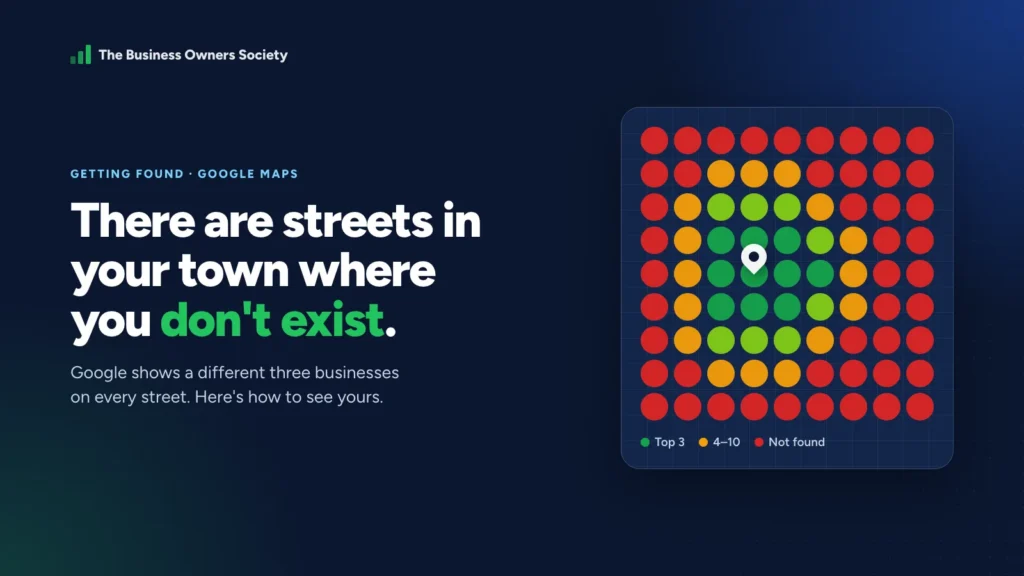
You have probably assumed you are one of the three. Most owners do, and near your own postcode you very likely are. But go two miles north and it changes. Go three miles east and it changes again.
This guide explains why Google shows different businesses on different streets, how to see where you disappear, and the three fixes, in order, that bring the red back to green. There is a free checker in the middle for the fix most owners get wrong.
How Google decides which three businesses to show
Google says its local results are based on three things working together (Google Business Profile Help):
Relevance
How well your profile matches what was searched. Your categories, services and description do the work here.
Distance
How far your business is from the person searching, or from the place they named. This is the one you can’t change.
Prominence
How well known you are: reviews and ratings, links to your website, and mentions of your business across the web.
Put those together and you get the problem. Near your base, distance carries you, so you show up even with a thin profile. Further out, distance starts working for whoever is closer, and only relevance and prominence can carry you over the top of them.
Google does not have one set of results for your town
It has a different set on every street. Where somebody is standing when they search matters as much as what they type, and for local trades it often matters more.
Which means “we come up on Google” is not a fact about your business. It is a fact about the spot you were standing in when you last checked, usually your own kitchen.
The way to see the truth is to check your position at dozens of points across the area you serve and plot them on a map. Green where you are in the top three, amber where you are just below, red where you do not come up at all. Click any square on the example below to see what a customer standing there would see.
Most owners look at their own map for about four seconds and understand their entire marketing problem. The red usually starts about a mile from the front door.
Why nobody checks
Because until recently, checking properly cost a few hundred pounds a month and you had to know what a geo-grid was. So owners check from home, see themselves at number one, and get on with their day.
Checking by hand doesn’t really work either. An incognito window still knows roughly where you are, and asking a mate across town to search for you once tells you about one street on one day. You need many points, checked at the same time, to see the shape.
That is what the free Google Maps scan does: it checks your position across a grid of points around your business and sends you the map.
What to do about the red: three fixes, in this order
- 1First
Fix what is wrong
Old phone numbers, old addresses, misspelt names.
- 2Second
Claim what exists
Directories that built a page for you from scraped data.
- 3Third
Add what matters
A handful of the right directories, not two hundred.
- ✓Then
Earn the distance
Complete profile, fresh photos, a steady flow of reviews.
None of these cost money. Name, address and phone must match everywhere.
None of these cost money, and the order matters. Adding new listings while old wrong ones are still out there makes things worse, not better.
1. Fix what is wrong before adding anything new
Somewhere out there a directory has your old phone number, your old address, or your name spelled differently. Google uses those mentions to work out whether you are a real, established business. When they disagree with each other, it is less sure, and a wrong listing can do more damage than a missing one.
ChatGPT for Business Owners
50 copy-and-paste AI prompts for sales, marketing, customers, admin and money. Works with any AI tool.
The details that have to match everywhere are your business name, address and phone number. Check yours below. Put in your details exactly as they appear on your Google Business Profile, then paste what each directory shows.
Listing consistency checker
Nothing you type here leaves your browser.
| Directory | Name shown | Phone shown | Address shown | Result |
|---|
Small differences matter less than big ones. “&” against “and”, or “Ltd” missing, is unlikely to hurt. An old phone number or a previous address is the kind of mismatch to fix first.
2. Then claim what already exists
Plenty of directories have already created a page for your business from scraped data. It is your business and somebody else’s information. Search your business name and phone number, list every directory page that comes up, and claim each one so you control what it says.
3. Then, and only then, add the ones that matter
A handful of the right directories beats two hundred of the wrong ones. Most of the long tail are scrape-farms that exist to pad a report. Start here:
| Where | Why it matters |
|---|---|
| Google Business Profile | The listing that shows in the map pack. Everything else supports this one. |
| Apple Business Connect | Feeds Apple Maps and Siri on iPhones. |
| Bing Places | Feeds Bing, and other services that use Bing’s data. |
| Facebook page | Commonly checked by customers, and another consistent mention of your details. |
| Your trade’s main directories | The two or three sites your customers actually use to find someone in your trade. |
| Your own website | Your name, address and phone in the footer, matching Google exactly. |
Members of the Society get the Citation Builder, which lists the directories that matter for their trade and town and tracks which ones are done.
Then make your profile earn the distance
Once your details are consistent, relevance and prominence are what carry you further out. Google’s own advice is to keep the profile complete and accurate, and to get and respond to reviews. In practice that means:
0 of 6 done.
Check yours
We will run the map for you for nothing. Put your details in here and we will email it within a day. No card, and nobody will ring you.
If it comes back green everywhere, genuinely well done, and you can stop reading. Almost none do.
Your two jobs this week
Job 1: See your map
Run the free scan for your main service and town, and note how far from your base the red starts.
Job 2: Fix three wrong listings
Search your business name and your old phone number. Use the checker above on the first five results, and correct or claim the three worst.
Members of the Society get jobs like these every week, with the tools to do them and somebody checking they got done. Start for £1 if you want somebody keeping count.
Google Maps visibility questions owners ask
Why does my business show on Google Maps at home but not across town?
Because distance is one of the three things Google uses to rank local results. Near your base it helps you; further out it helps whoever is closer to the searcher. Relevance and prominence are what carry you beyond that.
How do I check my Google Maps ranking in different areas?
You need to check from many locations at once, which is what a grid scan does. Searching yourself, even in incognito, only shows the results for where you are. Our free map scan checks a grid of points around your business.
Do wrong directory listings really hurt my ranking?
They can. Google looks at mentions of your business across the web to judge how established and trustworthy it is. If your name, address and phone disagree from site to site, it is less confident. Fixing old details is usually the first and cheapest win.
How many directories should my business be listed on?
Fewer than most reports suggest. Google Business Profile, Apple Business Connect, Bing Places, Facebook and the two or three main directories for your trade cover what matters. Accuracy beats volume.
Can I pay Google to rank higher on the map?
Not in the free results. Google says there is no way to pay for a better local ranking. You can pay for ads that appear above the map, but that is separate from where your listing ranks.

James Nicholson
Founder of The Business Owners Society and Digital Marketing Desk. Built a £2m business from his bedroom, lost it, and spent the next fifteen years helping 150+ UK businesses get found.
More about James →