There is a quote in your sent items from three weeks ago that you never chased.
ChatGPT for Business Owners
50 copy-and-paste AI prompts for sales, marketing, customers, admin and money. Works with any AI tool.
You know the one. You spent an hour measuring up, another hour pricing it, sent it over, and then heard nothing. And rather than chase, you told yourself they had probably gone elsewhere.
Some had. Plenty had not. They got busy, the email slid down the screen, and the person who did chase got the work.
This guide gives you a three-message follow-up sequence that gets replies, the exact words for email and text, a planner that writes and dates the messages for your next quote, and a way to work out what your unchased quotes are worth right now.
What are your unchased quotes worth?
Start with the number, because it is what makes the chasing feel worth doing. Count the quotes you sent in the last 90 days that went quiet: no yes, no no. Put in your average job value and a guess at how many of those you could still win with a proper follow-up.
£21,600sitting in quotes nobody has chased
£3,240of work you could win back this month
That is roughly 2 extra jobs, from messages that take about an hour to send.
Why owners don’t chase quotes
Not laziness. Chasing feels like begging, and nobody wants to be the pushy one. So the follow-up gets framed in your head as a favour you are asking, and it never gets sent.
Reframe it and the awkwardness goes. You are not asking for the job. You are closing the loop on a piece of work they asked you to do. They invited you round, they asked for a price, and you owe them a clear next step. That is just professional.
There is a second reason, and it is more practical: nobody has a system. The quote goes out from the van, the follow-up lives in your head, and your head is full. Which is why the second half of this guide is about making it happen without remembering.
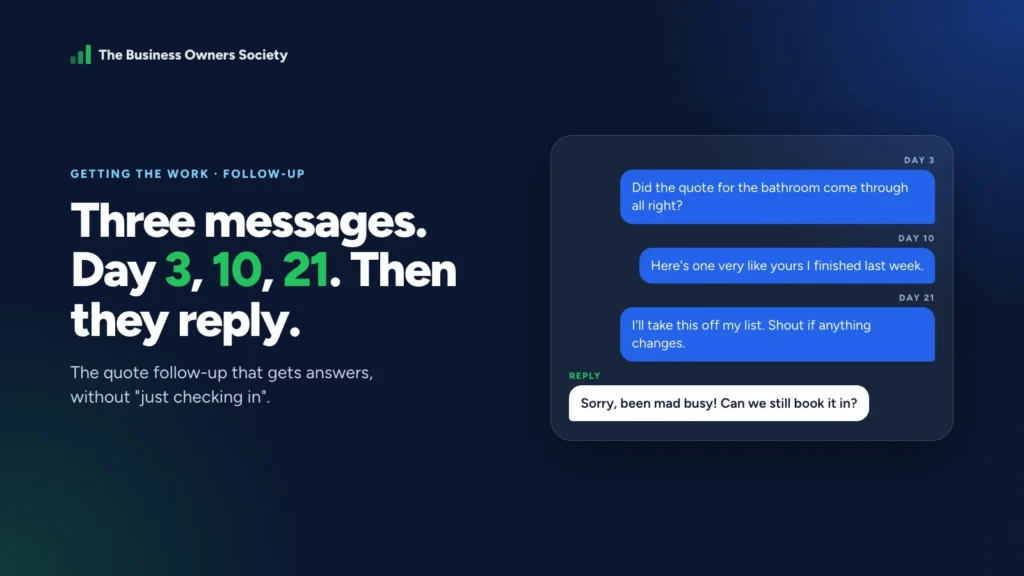
The three-message quote follow-up sequence
- 0Day 0
Send the quote
Within 48 hours of the visit. The fastest quote often wins on its own.
- 1Day 3
Check it arrived
Short, useful, no ask. Catches quotes lost to spam or a busy week.
- 2Day 10
Add something
A photo of a similar job, your lead time, or a smaller option.
- ✓Day 21
Close the file
“I’ll take this off my list.” The one people answer.
Then stop. Three messages, not five.
Three messages, each with a different job. None of them asks “have you made a decision yet?”, because that question is easy to ignore.
Day 3: check it arrived. Short, useful, no ask.
Subject: Your quote for the [job]
Hi [Name], I sent the quote for the [job] on [day]. Did it come through all right? Happy to talk through any of it, or adjust anything if the scope has changed.
[Your name]
Hi [Name], it’s [you] from [business]. Just making sure the quote for the [job] reached you. Any questions, give me a shout.
This one does a lot of quiet work. Quotes land in spam, get forwarded to a partner, or get read on a phone and forgotten. A short note that is easy to answer gets the replies the quote itself did not.
Day 10: add something. Give them a reason to reply.
The second message brings something new. You are giving them a reason to reply that is not “yes” or “no”. Pick one:
A similar job you finished
One photo and one line: “Did one very like yours in [area] last week, thought you might like to see how it came out.”
Your lead time
“I’m booking into [month] now. If you’d like the [date] slot I can hold it until Friday.” True urgency, not invented.
A question they haven’t asked yet
Planning, parking, how long the mess lasts, what happens if you find something behind the wall. Answer it before they wonder.
A smaller version
“If the full job is more than you wanted to spend, here’s what [smaller scope] would come to.” Gives a hesitant buyer a way in.
Subject: Re: Your quote for the [job]
Hi [Name], one more thing that might help. [Photo of a similar job / your lead time / the answer to a likely question / a smaller option].
ChatGPT for Business Owners
50 copy-and-paste AI prompts for sales, marketing, customers, admin and money. Works with any AI tool.
If it’s useful to talk it through, I’m about on [day] and [day].
[Your name]
Day 21: close the file. The one that works best.
Hi [Name], I haven’t heard back about the [job], so I’ll assume the timing isn’t right and take it off my list. If anything changes, just shout and I’ll pick it straight back up.
People answer that one. Partly because it is easy to reply to, and partly because of loss aversion: the moment you stop chasing is the moment they remember they wanted it. You will get a “sorry, been mad busy, can we still do it?” more often than you expect. You will also get some honest no’s, and they are useful too.
Plan the follow-ups for your next quote
Fill this in when you send a quote. It dates the three messages and writes them for you. Copy each one into your diary, your phone’s reminders or your email’s scheduled send.
Email, text or phone: which to use
| Channel | Best for | Watch out for |
|---|---|---|
| Day 3 and day 10, when you are attaching a photo or a revised option | Spam folders. Reply to your original quote email so it threads together. | |
| Text | Day 3 for domestic customers, and the day-21 close-the-file message | Keep it to two lines. Always say who you are; they may not have your number saved. |
| Phone | Bigger jobs, commercial customers, anyone who rang you in the first place | Ring once. If it goes to voicemail, leave a short message and send the text as well. |
Match the channel they used to reach you. Someone who filled in a web form will answer an email. Someone who rang you from a van will answer a text.
Never open with “just checking in”
It says nothing, asks for nothing, and puts the work of replying entirely on them. Every message should either give them something or make a decision easy.
| Instead of | Try |
|---|---|
| “Just checking in on the quote.” | “Did the quote come through all right?” |
| “Just wondered if you’d decided?” | “I can hold the [date] slot until Friday if that suits.” |
| “Any update?” | “Here’s a photo of a similar job I finished last week.” |
| “Sorry to bother you again…” | “I’ll take this off my list; shout if anything changes.” |
What to say when they reply
“It’s more than we expected.” Do not drop the price on the spot. Ask what they had in mind, then offer a smaller scope at their number. You keep your rate and they get a way to say yes.
“We’ve gone with someone else.” Thank them, and ask one question: “Was it price, timing or something else? It genuinely helps me.” The answers, collected over a few months, tell you more about your pricing than anything else will.
“Not right now.” Ask when would be a better time and put a reminder in for then. A quote that is not a no is not dead.
Make it happen without remembering
The sequence only works if it gets sent, and the follow-up that lives in your head is the one that never goes. Three ways to take it out of your head, from simplest to most automatic:
- Calendar reminders. When you send the quote, use the planner above and put three reminders in your phone. Free, and it works.
- Scheduled send. Gmail and Outlook both let you write an email now and schedule it for later. Write all three at once and schedule them; cancel the rest the moment they reply.
- A CRM that does it for you. Move the customer to a “quote sent” stage and the follow-ups go out on their own, stopping when they reply. We recommend GoHighLevel, which you can try free for 30 days through that link. Members get the follow-up workflow ready-built.
Quote follow-up mistakes that cost you the job
- Waiting too long to send the quote in the first place. The fastest quote often wins before any chasing is needed. Aim for within 48 hours of the visit.
- Chasing forever. Three messages, then close the file. A fifth email reads as desperate and teaches them to ignore you.
- Discounting in the follow-up. “I can knock 10% off if you book this week” tells them your first price was padded. Offer a smaller scope instead.
- Sending a group email to every open quote. Each one should name the person and the job. It takes a minute longer and gets far more replies.
- Not asking why you lost. Every “no” is free market research. Ask the one question.
Your two jobs this week
Job 1: Send the day-21 message to every quiet quote
Go into your sent items. Find every quote from the last 90 days that went quiet. Send the close-the-file message to each of them this afternoon, by name. For most trades that is an hour’s work and the best-paid hour of the month.
Job 2: Set up the sequence for every new quote
From your next quote onwards, use the planner above or a scheduled send so the three messages go out without you having to remember.
Members of the Society get jobs like these every week, with the tools to do them and somebody checking they got done. Start for £1 if you want somebody keeping count.
ChatGPT for Business Owners
50 copy-and-paste AI prompts for sales, marketing, customers, admin and money. Works with any AI tool.
Quote follow-up questions owners ask
How long should I wait before following up on a quote?
Three days for the first message. It is long enough that they have had a chance to read it, and short enough that it is still fresh. Then day 10 and day 21.
How many times should I follow up on a quote?
Three times over about three weeks, then close the file with a polite message. More than that rarely wins work and starts to cost you goodwill.
Should I follow up by text or email?
Match how they contacted you. Email suits longer messages, photos and commercial customers; text suits domestic customers and short messages. Using both, a day apart, is fine.
Is it pushy to chase a quote?
Not if each message is short and useful. They asked you for a price; making sure it arrived and answering their questions is good service. “Just checking in” every few days is what feels pushy.
What if they say my quote is too expensive?
Ask what budget they had in mind and offer a smaller scope that fits it, rather than cutting your rate. If price is all that matters to them, they may not be the right customer.

James Nicholson
Founder of The Business Owners Society and Digital Marketing Desk. Built a £2m business from his bedroom, lost it, and spent the next fifteen years helping 150+ UK businesses get found.
More about James →